Welcome to SheeTMS 💩

const GoogleSheetToJson = require('sheetms-webpack-plugin');
Revolutionary and easyCMS
- Because managing translations & copy files can be a nightmare, and the available translations services are expensive, requires a learning process and is difficult to maintain.
- Spreadsheets are widely known and a "must have" tool for any organization.
- Using spreadsheets to keep your copy and translations is not only free, easy to use and cool, but is the Sheet! 💩
How it works?
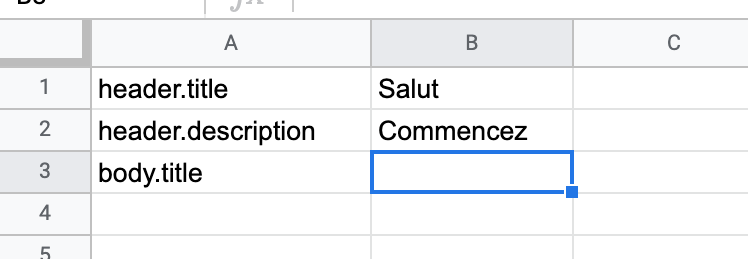
Create a Google Spreadsheet
Create a Google Spreadsheet and fill it with wanted data. In "A" column place keys and in the "B" column type the relevant translation.
 Remember to place the keys in A column and translations in the B column
Name the spreadsheet
Name the spreadsheets as languages name provided by browser namespace.
Example languages
- en for English
- en-GB for English spoken in United Kingdom
- fr-FR for French spoken in France
List you can find here: browser languages list
npm i sheetms-webpack-pluginInstall package in your project
Run yarn add or npm install command in order to add the package to your project
//Add this config in your plugins in webpack.config.jsnew GoogleSheetToJson({ spreadsheetId: 'mySecretSpreadsheetId',output: path.join(__dirname, '../src/translations/'),apiKey: yourApiKey,forceCreate: isEnvDevelopment})Configure
Create a configuration of the plugin in webpack.config.js
- spreadsheetId: string - The Google Spreadsheet id
- output: string - The absolute path to create the JSONs
- apiKey: string - Your Google App api key. Click here to learn how to create one.
- forceCreate: string : boolean - Forces the creation of all translation files. Useful when cold starting a project, and usually is set to true during development. Defaults to false.
//This is an example output in .json file{"pt-BR": {"title":"Título em Potuguês"}"en-GB": {"title":"Title in English"}"pl-PL": {"title":"Tytuł po polsku"}}Get your content!
Use content generated in .json files